
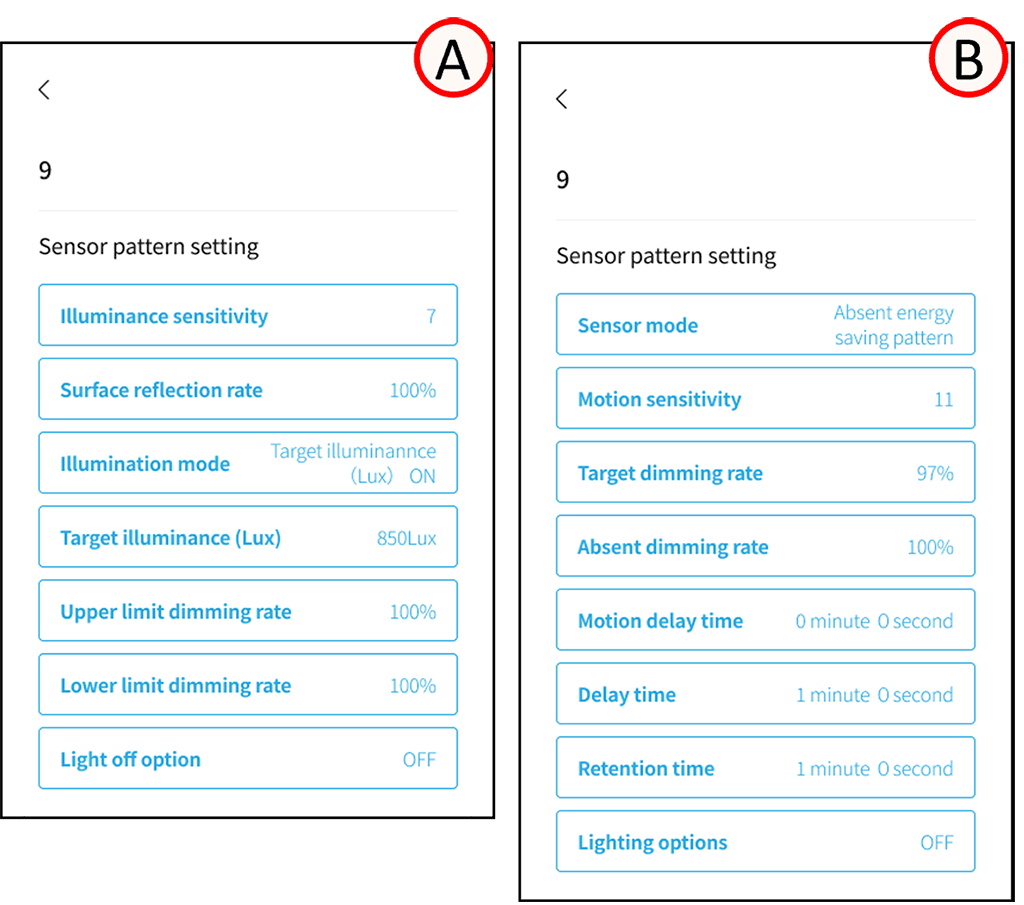
Configure the settings for each sensor individually.
*When registering multiple sensors to a single group as motion sensors, please ensure that the sensor settings for that group are consistent.
After selecting a pattern, enter the required information.
The required information for each pattern is as follows:
Tapping each setting item will take you to the settings screen.
Illuminance sensor mode (A) Illuminance (Lux or %) pattern
Illuminance Sensitivity [1 (High) ~ 7 (Low) Default Value: 4]
Surface Reflectance [1 ~ 100%]
Target Illuminance (% or Lux) [0 ~ 100%][0 ~ 4000 Lux]
Upper Dimming Limit [50 ~ 100%]
Lower Dimming Limit [0 ~ 100%]
Light Off Option
[ON/OFF Selectable, ON: 100 ~ 200%]
Motion sensor mode (B)
Motion Sensitivity [1 (High) ~ 15 (Low) Initial Setting: 6]
Target Dimming Rate (%) [0 ~ 100%]
Absence Dimming Rate [0 ~ 100%] (*1)
Motion Delay Time [0 minutes 1 second ~ 4 minutes 15 seconds]
Delay Time [0 minutes 0 seconds ~ 42 minutes 30 seconds] (*2)
Hold Time [0 minutes 1 second ~ 42 minutes 30 seconds]
Lighting on Options
[ON/OFF selectable. ON: 0 ~ 100%]
*1 Only the “Absence Energy Saving” and “Absence Leaving Items Behind” patterns can be set.
*2 Only the “Absence Leaving Items Behind” pattern can be set.
Motion delay time
This is the time period during which a person is considered present (within the detection range) even if they are no longer present (have moved outside the detection range).
Note that while the motion detection delay time is active, the sensor is still detecting a person (determining that a person is within the detection range), so the detection start will not be reset even if someone enters or leaves the sensor.
*This setting is adjustable for the FX428W. For the FX428WA and later models, it is fixed at 1 second.
Lights off option
[Illuminance (Lux)] e.g.: If the “off” option is ON and the setting is 200%, this function will turn off the light regardless of the minimum dimming setting if 200% of the target illuminance can be achieved with only ambient light.
[Illuminance (%)] e.g.: If the “off option” is ON and the setting is 200%, this function will turn off the light regardless of the lower dimming limit when 200% illuminance can be achieved with ambient light alone compared to the state at the time of calibration.
Lighting on Options
e.g.: If the lighting option is ON and set to 100%, the light will not turn on even if motion is detected if 100% illumination can be achieved with ambient light alone compared to the state at the time of calibration.