
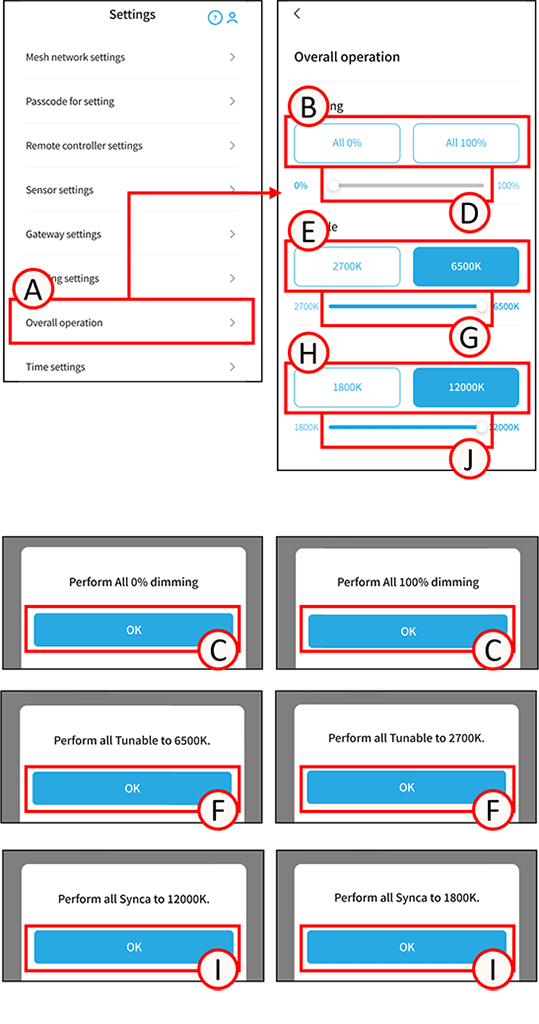
You can turn all lighting fixtures registered in the mesh network on (100% dimming) or off (0% dimming).
This also applies to lighting fixtures registered in the mesh network but not registered in a group.
For more detailed settings, please create a group.
Overall operation
1
Tap A.
The overall operation screen will open.
Dimming all lighting fixtures
2
Tap any of B. A confirmation screen will open.
Tap C.
You can also control the dimming level to any desired level by adjusting the slider bar on D.
Color-tuning for all Tunable lighting fixtures
3
Tap any E. A confirmation screen will open.
Tap F.
You can also control the color tone to any value by adjusting the slider bar for G.
Color-tuning for all Synca lighting fixtures
4
Tap any H. A confirmation screen will open.
Tap I.
You can also control the tonal value by adjusting the J slider.