
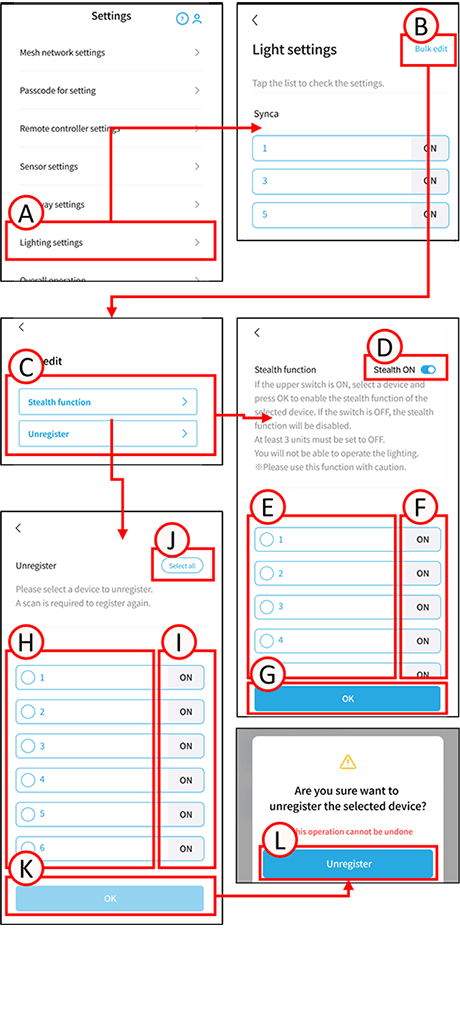
ou can configure the stealth function (radio interference countermeasure) and unregister all luminaires and repeaters simultaneously.
1
Tap A.
The lighting settings screen will open.
2
Tap B.
The batch editing selection screen will open.
3
Tap any C.
The various settings screens will open.
Batch stealth settings
1
Tap D.
Toggles Stealth ON ⇔ Stealth OFF.
Stealth setting ON: Radio interference countermeasure function ON
Stealth setting OFF: Radio interference countermeasure function OFF
2
Tap E on the device whose stealth function you want to change to select the box. Tap F to turn the target light fixture ON or OFF.
3
Tap G.
The stealth settings of the selected device will be changed.
*Devices that cannot be configured with the stealth function will be displayed as unsupported. To enable stealth functionality, you will need to replace or update to a compatible device.
*When using stealth functionality, please use at least three devices with stealth enabled. Lighting control will become impossible.
Recommended devices to keep stealth functionality OFF are:
• At least one device per power circuit
• A device located in the center of the control range
*The control range of a terminal is limited to a 10m radius within line of sight of a device with stealth disabled.
Batch Unregister
*All settings made to the target device using this system will be reset, and the connection to the mesh network will be disconnected.
1
Tap the H of the device you want to unregister to check the box. Tapping I will turn the selected light fixture ON or OFF.
Selecting J will select and unregister all devices.
2
Tap K.
A confirmation screen will appear; tap L.
The batch unregistering of the selected devices will begin.*Please do not move the devices during the unregistering process.