
The mode switching function is a feature that is only available on handheld remotes.
■View of the remote control from the back
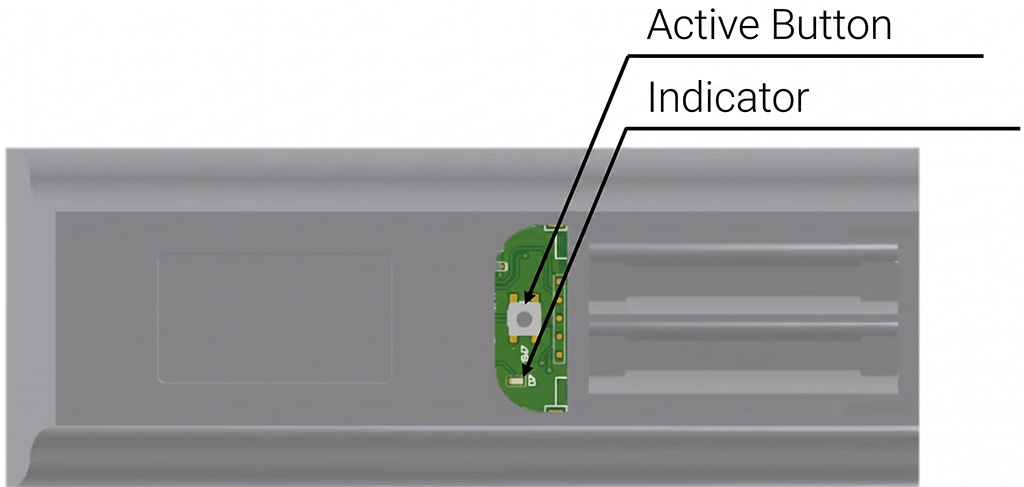
Removing the battery cover reveals the active button.
Initially, or during normal use, it operates in sleep mode.
To change settings, press the Active button to enter setting mode.
Due to high battery consumption, please press the Active button again to exit setting mode once you have finished configuring the settings.
■Notes
Press and hold the reset button for 10 seconds or more to reset the settings to their default state.
■Indicator Operation Table
.postEditor .wp-block-table table td { width: auto!important; font-weight: normal!important; } @media screen and (max-width: 768px) { .scroll { overflow-x: auto!important; overflow: scroll; } .postEditor .wp-block-table table td { width: auto!important; display: table-cell; font-size: 100%!important; border-bottom: 1px solid #dddddd; padding: 1em; border-collapse: collapse!important; } .postEditor .wp-block-table table tr:first-child td:not(:first-child){ border-top: 1px solid #dddddd; border-collapse: collapse!important; } .postEditor .wp-block-table table td:first-child{ border-bottom: 1px solid #dddddd; border-collapse: collapse!important; } } @media screen and (min-width: 768px) { .display_sp{ display: none; font-size: 100%; }| indicator | operation | Description and condition |
| Indicator *Only for the handheld remote control (FX-431W) | Light up | Setting Mode |
| Lights off | Sleep mode | |
| Scene buttons 1-6 indicator | Light up | When you press the Scene 1-6 buttons |
| All 1-6 are flashing. | ・”- When communication is successful during device discovery – When selected from the remote control settings screen – When a scene is set to a button and saved” |
*Please scroll horizontally to view this table.