
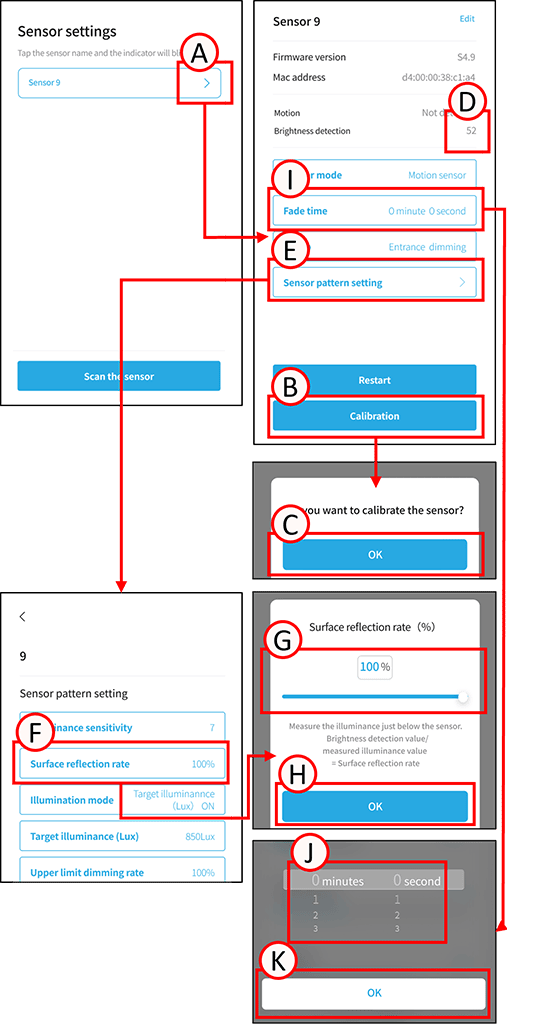
Calibrate the sensor and set the surface reflectivity.
In an environment without external light, such as at night, ensure all lighting fixtures are turned on at 100%.
Ensure that the sensor mode and group settings are complete.
*Calibration is not required if you are using the motion sensor and not using the lighting option.
1
Tap A.
The sensor settings screen will open.
2
Make sure there are no people within the sensor’s detection range, then tap B.
A confirmation screen will appear; tap C.
*If you are not using the “Target Illuminance (Lux)” illuminance mode, the calibration is complete at this point.
3
The illuminance directly beneath the sensor is measured by an illuminance sensor, and the surface reflectance is calculated.
Formula:
Surface reflectance = Brightness detection value (D) ÷ Measured illuminance value
4
Tap E.
The sensor pattern settings will open.
5
Tap F.
The surface reflectivity settings screen will open.
6
Enter the surface reflectance calculated in step 3 into G either as a numerical value or by adjusting the bar.
7
Tap H.
Surface reflectance setting is complete.
Sensor fade time setting
1
Tap A.
The sensor settings screen will open.
2
Tap I.
The fade settings screen will open.
Scroll J to set the minutes and seconds as desired.
Tap K.
The fade settings are complete.