Regarding the recovery time of scheduled operations
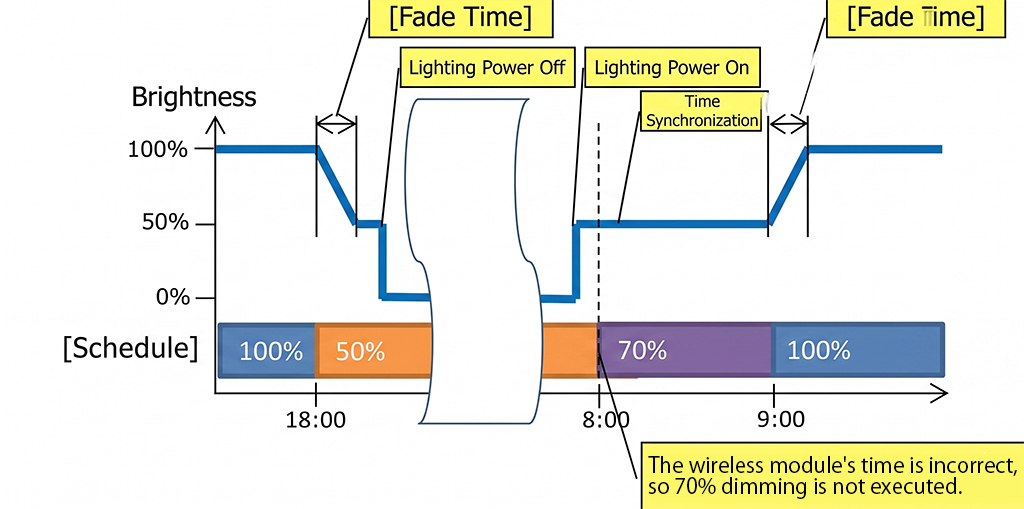
Scheduled operations are based on the time (counter) information stored in the wireless module.
Since the time may become inaccurate due to temporary power interruptions in the lighting fixtures, the gateway performs time synchronization every 5 minutes.
For the gateway’s time correction method, please refer to Setting the time.
If the dimming rate is changed by the schedule between turning on the lighting and performing time synchronization as shown below, the dimming command will not be reflected.
About the timing of time synchronization and the schedule switching time
About communication recovery after the lighting fixture is turned on
This system is a wireless light control system. The lighting fixtures have built-in wireless modules. If the power to the lighting fixture is turned off from a communicable state, the communication is interrupted, so when the power is turned on again, some connection time is required until communication recovers.
The gateway, sensors, and remote controllers are also communication devices with built-in wireless modules. Therefore, connection time is required until communication recovers. Please keep the gateway, sensors, wall mount remote controller, non-voltage a-contact unit, and PWM signal unit powered on all day.
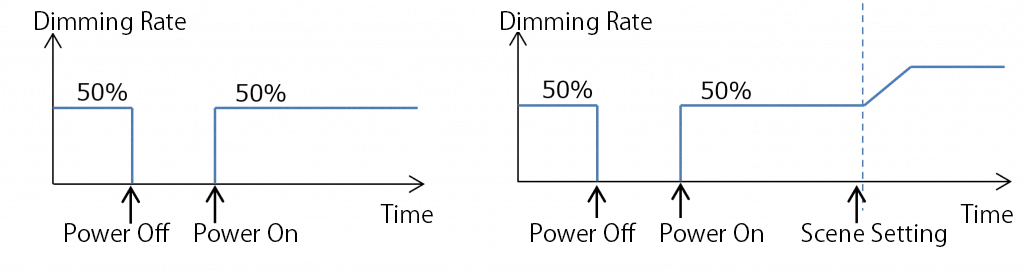
In this system, to avoid a situation where the lighting fixtures do not turn on, it is designed to turn on at the dimming rate and color temperature when the lighting fixtures were turned off, until communication recovers.* It takes about 5 seconds to memorize the dimming rate and color temperature, so please wait at least 5 seconds after changing the settings.
If the dimming rate is 0% when the power is turned off, it will turn on at a dimming rate of 5%. In addition, in the scene switch operation during scheduled operation, it will not switch to the scene registered in the schedule at the time the power is turned on. It will switch at the next scene setting time.