
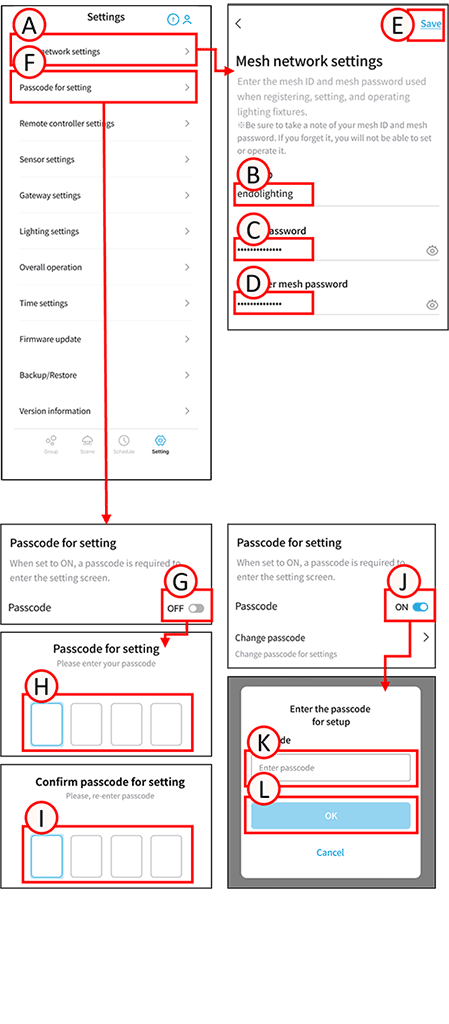
Mesh network configuration
1
Tap A.
The mesh network settings screen will open.
2
Tap B and set your desired Mesh ID.
The Mesh ID can be 8 to 16 alphanumeric characters and symbols.
*Available symbols : !#$%&’()+,-;=@[]^_{}~
3
Tap C and set your desired mesh password. The mesh password can be 8 to 16 alphanumeric characters and symbols.
*Available symbols: !#$%&’()+,-;=@[]^_{}~
 Tapping the icon will display the settings.
(You cannot set up the mesh network without setting both the Mesh ID and password.)
4
Tap D.
Enter your mesh password again for confirmation.
5
Tap E.
Mesh network setup is complete.
Passcode setting
Tap F. The passcode setting screen will open.
Turn on the passcode
1
Tap G. Switch it to ON.
The passcode entry screen will open.
2
Enter any passcode in H.
3
Enter the same passcode into I again for confirmation. Passcode setup is complete.
*If you forget your passcode, you will not be able to set it up again. Please record and store it properly.
Turn off the passcode
1
Tap J.
The passcode confirmation screen will open.
2
Tap K. Enter your passcode.
3
Tap L.
Passcode unlocking complete.