
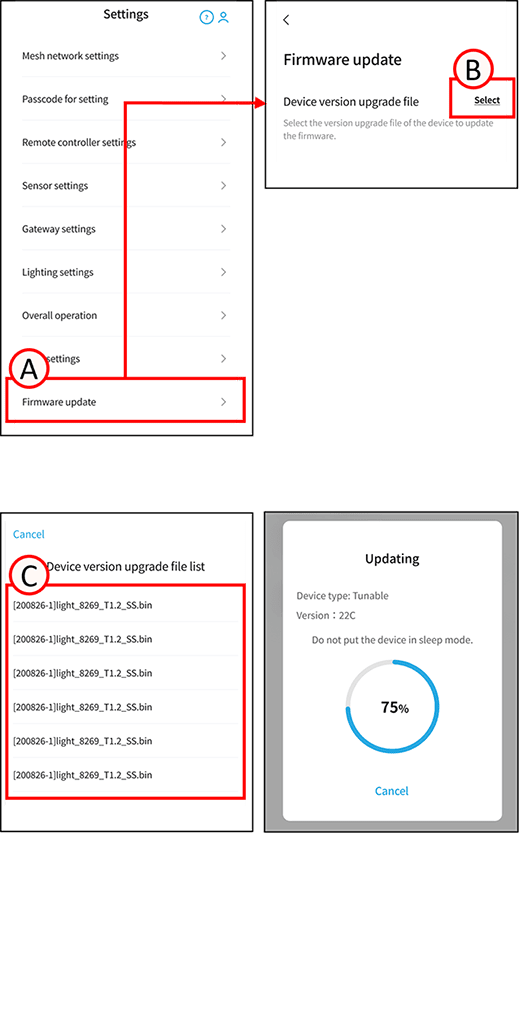
This function updates the firmware of wireless modules, gateways, sensors, and other devices.
Update the firmware
1
Tap A.
The firmware update screen will open.
2
Tap B.
The firmware file list screen will open.
3
Select the desired file from list C.
Firmware is separated by device.
Check the file name to confirm. You cannot switch to other screens during the update.
Example: [20230331]light_8269_H1.6_HRC.bin
HRC indicates the device type, and H1.6 indicates the version.
【device】
| SS | Motion/Illuminance sensor |
| GW | gateway |
| HRC | Handheld remote control |
| WRC | Wall-mounted remote control |
| WM1 | Wireless module (dimming) |
| WM2 | Wireless module (dimmable and color adjustable) |
| AC | Phase dimming unit |
| CC | a-contact unit |
| PWM | PWM signal unit |
| WR | Wired repeater, DALI converter |
[Version] 2C means “2.C,” and the letter changes from C→D→E… with each version upgrade.
4
Please wait until the update is complete.
This will take approximately 30 minutes.